
Storage costs have been climbing for years because content keeps accumulating and almost nobody takes the time to clear it out. That’s the problem retention policies and periodic clean-up projects were meant to solve, but growing data volumes are quickly outpacing those efforts.
Now there’s a second factor driving IT budgets up: AI agents constantly run against that same backlog of redundant, obsolete, and trivial (ROT) content, and every duplicate file, outdated version, and forgotten folder slows them down and increases the cost of each task. With AI pricing shifting to usage-based models, every wasted search now shows up on the bill.
Storage optimization means reducing what you pay to store, back up, and protect content that no longer provides value. The case for these initiatives used to rest on the storage bill alone. Now it rests on your AI ROI, too; the same ROT driving up storage costs is driving up what your agents cost to run.
For the IT director explaining an unexpected credit spike to leadership, or the CFO reviewing next year’s Microsoft 365 Copilot renewal, this is where the two budgets stop being separate conversations.

The ROT Data Problem: What It Is and Why It’s Piling Up
ROT data is redundant, obsolete, or trivial content: duplicate files, stale documents that haven’t been accessed in years, personal files that landed in a shared drive and stayed there after an employee departed, etc. Most of it holds little to no business value, yet it still drives up storage costs even though no one is looking at it.
This is a volume problem more than a discipline one. Content gets created faster than any team can review it, and project folders routinely outlive the projects that made them.
IDC’s current forecast puts the world’s data on a trajectory to surpass 700 zettabytes by 2030, a pace that’s only accelerating as content is increasingly generated by AI workloads. Most of what gets created is never revisited, which is exactly how a large share of any content estate turns into duplicates and dead weight that nobody took the time to clean up.
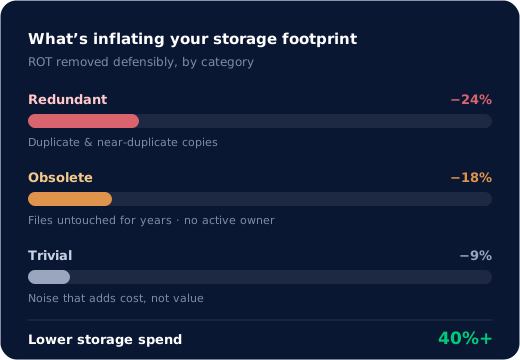
So how much does inactive content add to a storage bill? According to Deloitte, ROT makes up 40 to 50 percent of enterprise content, and it’s sitting in active storage tiers at active-storage prices.
That figure holds steady across industries because the underlying behavior isn’t industry-specific. Most organizations defer this cleanup at some point. Very few get ahead of it before the cost compounds.
How Inactive Content Increases AI Costs
Inactive content increases AI costs because agents must sift through more of it to find what’s usable. As enterprise AI shifts from single-response tools to agents that run multi-step tasks, flat-rate pricing is starting to break down. The cost of an agent’s work varies too much by task to charge the same fee per user license, so vendors are metering it directly instead. Microsoft’s Copilot Cowork is a clear example: it bills separately from the standard Copilot seat, based on actual usage. Expect this pattern to keep showing up as agentic AI adoption grows, not just with Microsoft.
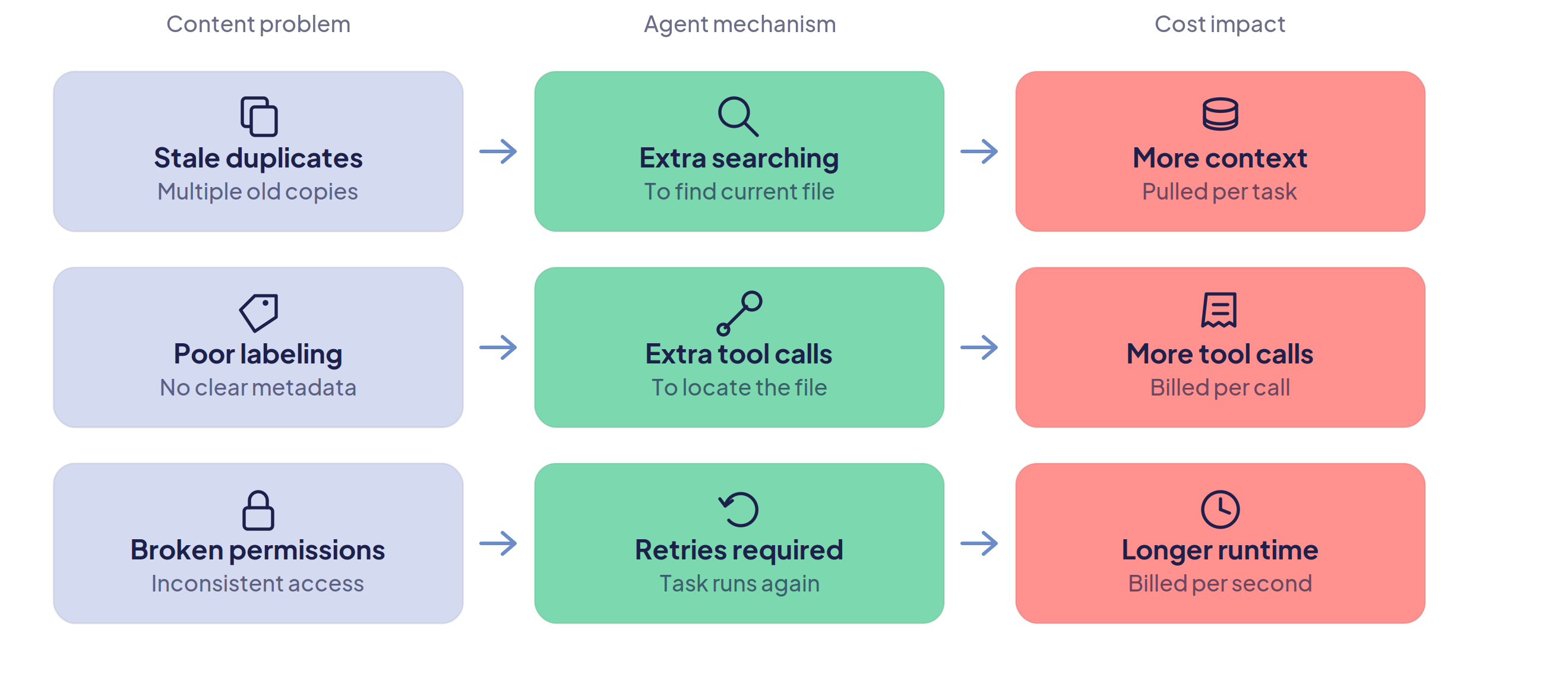
Under Microsoft’s pricing model, Copilot Credit usage for a given task is driven by four factors: the model selected, the runtime a task consumes, how much organizational context it draws on, and how many tools it calls to complete the work. Three of these factors depend directly on the volume of content the agent is required to sift through to get the task done.
Agents running tasks in a cluttered, duplicate-heavy content estate quickly increase AI costs. An agent grounding a task in “the current version of this policy” has to search through every outdated copy before it finds the one that’s actually current, pulling in more context per task as a result. When files aren’t labeled or organized well, the agent can’t go straight to the right one, so it issues additional tool calls to triangulate it instead. And when permissions are inconsistent, tasks stall or return partial results that have to run again, extending runtime on work that should have finished on the first attempt.
Consider a team running a few hundred Cowork tasks a month. If even a third of the content those tasks search through is duplicate, outdated, or otherwise irrelevant, every one of those tasks is burning extra runtime and context on files that should never have been in scope. Obviously not a guaranteed ratio for every environment, but it’s the shape of the cost. It becomes a recurring line item that compounds the same way the storage bill does, month over month, task after task.
The same ROT data that has been inflating storage bills is now increasing another bill, raising the stakes on storage optimization initiatives; the AI budget sitting behind the storage bill is exposed, too.
Signs This May Already Be Happening to You
- Copilot or Cowork answers have referenced an outdated policy, price/SKU, or contract version
- IT can’t say what percentage of the content estate is duplicate or stale
- Storage costs and AI credit costs get reviewed in separate budget conversations
- Archiving decisions are still made by folder site or age cutoff, rather than at the individual file level
Deleting or Archiving Inactive Content Now Takes More Precision
Bulk archiving and bulk purging to reduce data storage costs don’t hold up in this new environment. Moving an entire folder or site to cold storage, or deleting based on broad criteria like age alone, treats every file in scope the same way, whether it should be or not. Should inactive content be deleted or archived? Neither, categorically. It depends on whether that specific file might still need to be retrieved, a question bulk cost-cutting approaches never actually ask. Now that agents run against this content at machine speed, these moves are riskier. Delete the wrong file and an agent gives you a wrong answer. Archive too broadly and people start working around the system instead of with it.
Getting ROT data remediation right in this new environment means evaluating content file by file rather than by folder or site, weighing creation date, last accessed date, file type, ownership, sensitivity, and document context to determine whether a given file is genuinely inactive.
And yet this approach is still wrong if archiving means losing access to the file. Done well, an archived file gets replaced with a lightweight placeholder in its original location, still visible, still searchable, and restorable in a click if someone needs it later. This mechanism is what makes archiving the safe default rather than a risky one.
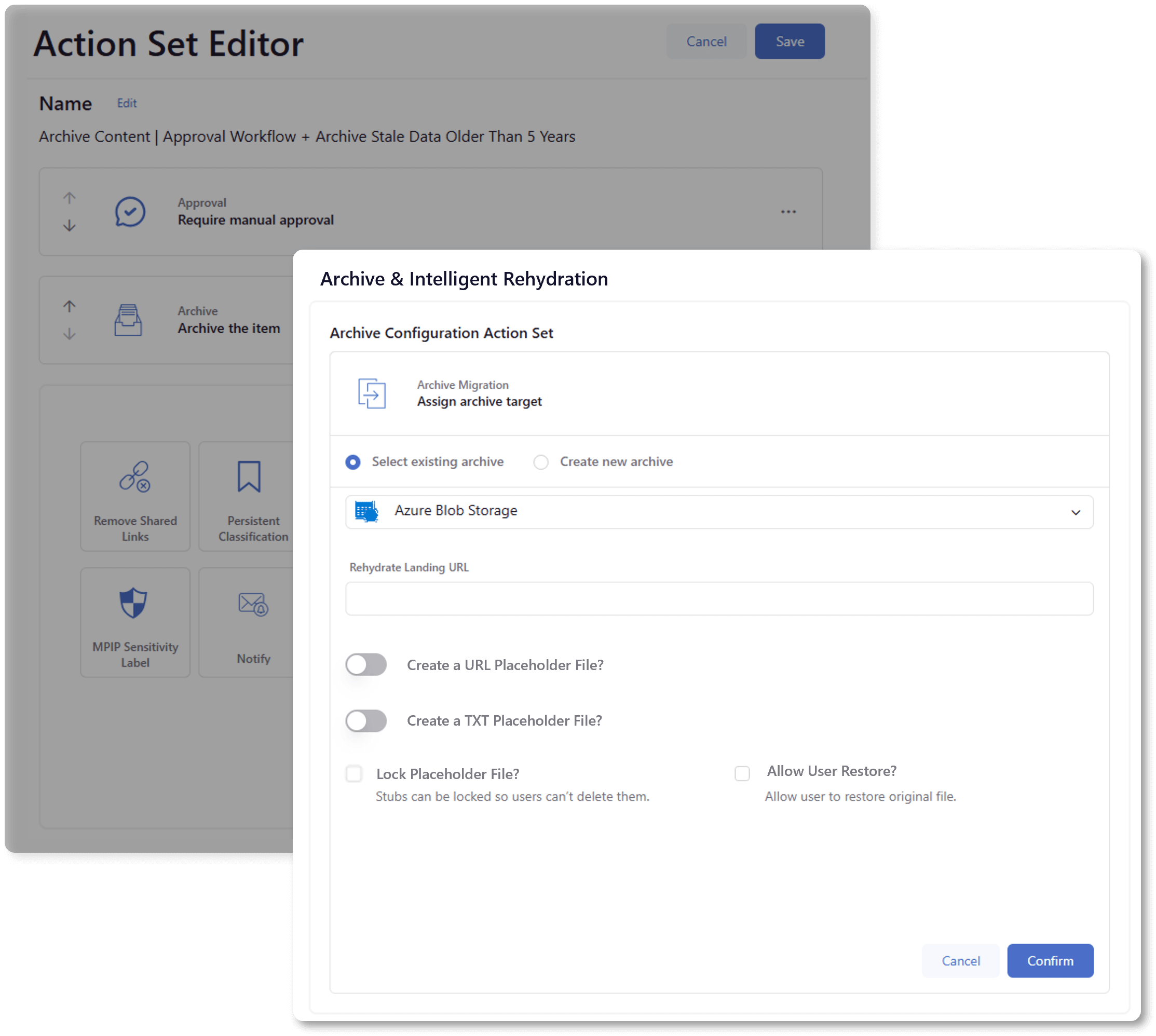
And because content keeps getting created every day, at a scale that is nearly impossible to keep up with, this isn’t a manual project with an end date. It must run continuously at scale across all repositories, or both the storage savings and the AI ROI gains will start eroding again almost immediately.
Storage Optimization Doesn’t Just Cut Costs. It Improves AI Performance.
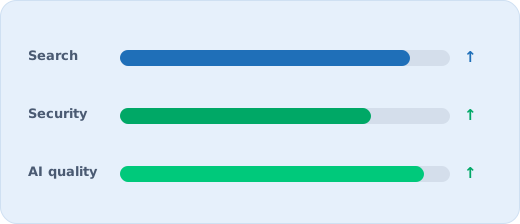
Storage optimization improves AI performance by shrinking the active estate down to what’s genuinely current and trustworthy, so every agent grounds its answers in fewer, better files instead of searching past everything that shouldn’t still be there. People benefit from the same reduction. Searches return the correct document rather than six versions of it (or the wrong one), whether a person is looking for it or an agent is retrieving it on their behalf. Compliance has less exposure to track. And AI, whether it’s summarizing a policy or grounding an agent’s next task, works from content it can trust.
That’s what raises the value of storage optimization beyond the storage line: it protects the growing share of AI budget sitting right behind it. ROT has become the same lever on two bills instead of one.
“The same ROT that’s been costing you a storage bill is now costing you an AI bill. It’s one lever pulling on two budgets.”
DryvIQ’s rationalization and archiving approach is built around exactly this kind of file-level precision, weighing age, activity, duplication, ownership, and sensitivity so every reduction is defensible and nothing anyone still needs goes missing. One large healthcare organization used intelligent archiving during a complex carve-out and cut storage costs by 72 percent, without a single support ticket for a file someone couldn’t find.
This is part of a broader shift: DryvIQ’s approach to AI-ready data ensures content isn’t just archived correctly, but genuinely ready and cleaned up for whatever AI is built to run on it next.
If ROT is running up your storage bill, it’s already running up your AI bill too. See what it’s costing you with DryvIQ’s ROI calculator, or talk to our team about a defensible, continuous approach to fixing both.
Interested in learning more? Join us on for a live webinar Tuesday, November 10 where we’ll be sharing how you can get ahead of this problem now. Register today!
Frequently Asked Questions
What is ROT data?
ROT stands for redundant, obsolete, and trivial content: duplicate files, outdated documents, and files that no longer serve a business purpose but still sit in active storage at active-storage prices.
Does bulk archiving still work for cutting storage costs?
Not always. Bulk archiving by folder, site, or age alone treats every file in scope the same way. Now that AI agents run against that content at machine speed, file-by-file evaluation is what keeps archiving both effective and safe for teams and AI use.
How do inactive content and ROT data affect AI costs?
Agents have to search through it to find what’s usable, which increases the context, tool calls, and runtime that usage-based AI pricing meters and bills for.
How is this different from a one-time cleanup project?
Content is created every day, so remediation must run continuously across all repositories. A one-time project starts eroding the moment normal business activity resumes.
How much does it cost to run an AI agent against a cluttered content estate?
More than it should. Usage-based AI pricing meters runtime, context pulled in, and tool calls, and all three climb when an agent has to work through duplicate files, outdated versions, and unlabeled folders to complete a task. A request that should resolve in one pass instead requires extra searching, extra context, and sometimes a second attempt, and each of those is a separate line item on the bill.
What is data archiving, and how is it different from deletion?
Deletion removes a file permanently. Archiving moves a file out of active, high-cost storage while keeping it retrievable, ideally through a placeholder left in its original location so it’s still visible and searchable. Done well, archiving cuts storage costs without the risk of deletion: nothing is gone, it’s just no longer sitting in an expensive tier or in an AI agent’s search path.